
Select and share
Select the voice message, open the three-dot menu, and tap Share.
Android app feature
On Android, share a WhatsApp voice message directly with Gyuret Notes. The audio opens already loaded in the app, and you decide when to start transcription.
Android step by step
This flow is for people who already have the Gyuret Notes app installed on Android. Button names and positions may vary by WhatsApp version and device.
Select the voice message, open the three-dot menu, and tap Share.
In the Android share sheet, select Gyuret Notes.
The app opens with the audio loaded. Review the file and start transcription when you are ready.
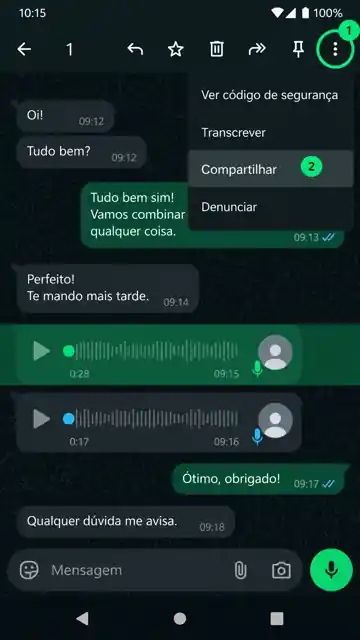
With the voice message selected, open the three-dot menu and choose Share.
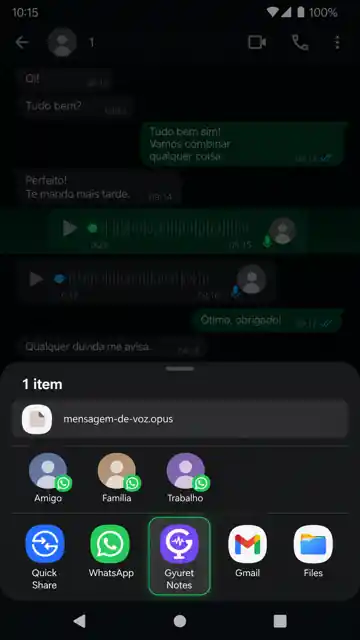
In the Android share sheet, tap Gyuret Notes to send the selected audio file.
Review the received file and start transcription when you want.
WhatsApp voice to text
If you received a long voice message or cannot play audio where you are, share the file with Gyuret Notes and turn the spoken content into text. The transcript is organized into timestamped segments so you can read it and return to a specific part more easily.
If the app does not appear
First, make sure Gyuret Notes is installed and up to date on Android. Then open the voice message and Share menu again. Android builds the app list, so it can vary between devices and versions.
Open Gyuret Notes normally to confirm that it is installed and working on the device.
Return to WhatsApp, select the voice message, and reopen the list of apps available for sharing.
If you prefer, save the audio file and upload it manually with the general audio-to-text tool.
Voice message format
Gyuret Notes processing has been validated with an OGG file using the Opus codec, a common combination for voice messages. This lets shared audio continue through the same transcription flow used by the Android app.
What happens when you share
Gyuret Notes does not enter your WhatsApp account, read conversations, or access contacts. Android gives the app only the audio file you chose. Transcription does not start by itself: the audio opens loaded first so you can review it.
For details about data handling, see the Privacy Policy.
After transcription
The transcript is organized into timestamped segments. In the Android app, you can tap a segment to play the corresponding part of the audio directly. You can also create a summary or translation and keep the content in history when those features are available on your plan.
WhatsApp's own option
WhatsApp offers native transcription when the feature and language are available on the device. In Gyuret Notes, the transcript is organized into timestamped segments, and in the Android app you can tap a segment to play that part of the audio. You can also create a summary or translation and keep the result in history. See the official WhatsApp guidance.
Frequently asked questions
Direct sharing from WhatsApp to Gyuret Notes is an Android app feature. In a browser, you can save the audio and upload it manually with the general audio-to-text tool.
No. On Android, you choose a voice message and use the Share action. Gyuret Notes receives only the selected file; it does not access your account, conversations, or contacts.
No. The app receives the shared audio and loads it for you to review. You decide when to start transcription.
Make sure the Android app is installed and up to date, then open WhatsApp's Share menu again. If it still does not appear, you can save the audio and use the audio-to-text tool in your browser.
Processing has been validated with an OGG file using the Opus codec, a common format for voice messages. The result depends on the file being readable and the speech being audible.
No. Gyuret Notes organizes the transcript into timestamped segments. In the Android app, you can tap a segment to play the corresponding part of the audio directly.
Yes. The transcript is separated into segments associated with timestamps, which makes longer voice messages easier to navigate. In the Android app, those segments also work as shortcuts to the corresponding point in the audio.
WhatsApp offers native transcription when the feature and language are available on the device. In Gyuret Notes, the transcript is organized into timestamped segments, and in the Android app you can tap a segment to play that part of the audio. You can also create a summary or translation and keep the result in history when those features are available on your plan.